
Collider
extends Component
Base class for all colliders.
You can obtain a Collider object by:
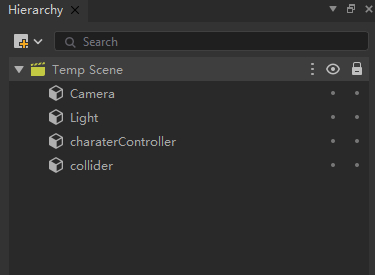
First, create a capsule charaterController and a cube collider in the scene (as shown in the image below). Add a CharaterController component and a BoxCollider component to them respectively. Check the "Is Trigger" property for the BoxCollider component. Set their positions to (0,0,0) and (0,2,0) respectively. Finally, attach the script to the charaterController game object.
typeScript
class New_TypeScript
    extends Component {

    OnStart(): void {
        Debug.Log("OnStart");

        let charater = this.gameObject.GetComponent<CharacterController>(CharacterController);
        charater.Move(new Vector3(0,1,0));
    }

    OnTriggerEnter(collider):void{

        Debug.Log(collider);
    }
}
成员变量
Collider.bounds : Bounds |
| The bounding box of the collider. |
Collider.isTrigger : Boolean |
| Whether this collider is configured as a trigger. |
Collider.contactOffset : number |
| The contact offset of the collider. |
Collider.attachedRigidbody : Rigidbody |
| The Rigidbody associated with the collider. |
Collider.sharedMaterial : PhysicMaterial |
| The shared physics material of the current collider. |
Collider.material : PhysicMaterial |
| The physics material used by the collider. |
成员方法
Collider.ClosestPoint ( position : Vector3 ) : Vector3 |
| The point on the collider that is closest to the given position. |
Collider.ClosestPointOnBounds ( position : Vector3 ) : Vector3 |
| The point on the surface of the collider's bounding box that is closest to the given position. |
Collider.Raycast ( ray : Ray , maxDistance : number? ) : RaycastHit|undefined |
| Check if a ray intersects with a collider. |