
TransitionControl
extends Control
The TransitionControl class is used to implement simple interactive transition animations.
You can obtain an interactive control of type Button using the following method:
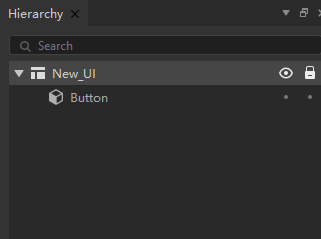
typeScript
let go = new GameObject("ui");
let uiComponent = go.AddComponent<UIComponent>(UIComponent);
let canvas = uiComponent.canvas;
let button = canvas.FindChild<Button>("Button");
成员变量
TransitionControl.interactable : boolean |
| Can Interact. |
TransitionControl.transitionMode : TransitionMode |
| Transition mode. |
TransitionControl.normalColor : Color |
| Normal state color. |
TransitionControl.highlightedColor : Color |
| Highlight state color. |
TransitionControl.selectedColor : Color |
| Selected state color. |
TransitionControl.pressedColor : Color |
| Pressed state color. |
TransitionControl.dissabledColor : Color |
| Color of the disabled state. |
TransitionControl.colorMultiplier : number |
| Control color multiplier. |
TransitionControl.fadeDuration : number |
| Transition time. |
TransitionControl.normalTexture : Texture |
| Normal map. |
TransitionControl.highlightedTexture : Texture |
| Highlighted state texture. |
TransitionControl.pressedTexture : Texture |
| Hold state texture. |
TransitionControl.selectedTexture : Texture |
| Selected state texture. |
TransitionControl.dissabledTexture : Texture |
| Inactive state texture. |